





1/5
pagare in 3 o 4 rate
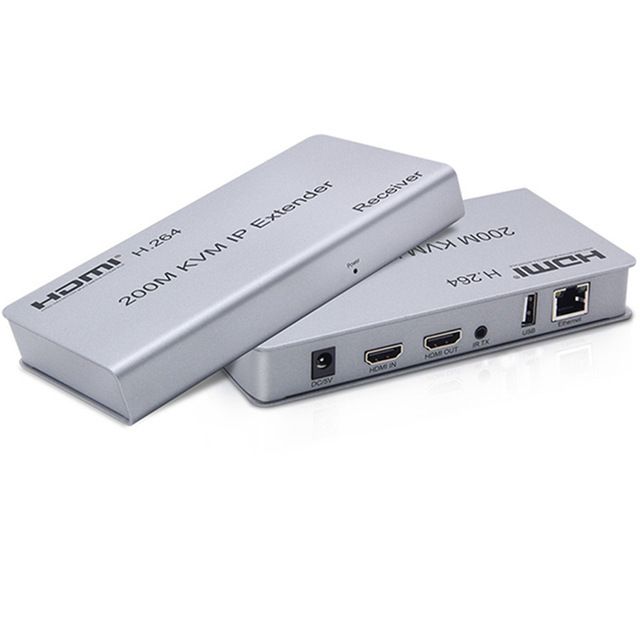
Extender KVM HDMI 200M su IP/TCP Ethernet CAT5e/6 H.264 HDMI Extender con supporto USB 2.0 Mouse Tastiera per Webcam PC HDTV
297.61
495.20
-40%
2500.00-250.00
1999.00-200.00
1299.00-130.00
889.00-90.00
Articolo n.: 27623630
colore
1,99€ Consegna Voghion
Arriva in 18~30 giorni lavorativi
Buyer Protection
Descrizione dell'articolo da parte del venditore
Features:
● Support HDMI 1.3
● Support point-to-point mode, one point-to-multi point mode and cascade connectionmode.
● 802.3 Ethernet standard.
● Support IR remote control
● Support USB mouse and keyboard extension.
● The design of pure hardware, plug and play, no need for additional software.
Specifications:
Resolutions :480p,720p,1080p
Audio :Sample rate:32kHz,44.1kHz and 48kHz code
IR remote control :38 KHz;NEC
HDMI version :HDMI 1.3
Power adapter :DC:5V/1A
Power consumption :HDMI sender:3W HDMI receiver:3W
Size(L-W-H) :163*87*24mm
Weight :474gX2
Operating Temperature/Humidity: 0℃-45℃/10%-80%RH(no condensation)
Storage Temperature/Humidity :-10℃-70℃/5%-90%RH(no condensation)
Connection and operation:
1) Connect the HDMI source (such as DVD, PS3, STB ) to the "HDMI IN" of transmitter by HDMI cable.
2) Connect the "HDMI out" of Receiver to HDTV display by HDMI cable.
3)Connect the Transmitter and Receiver with one cat5e/6 cable (recommend).the furthest distance is 200M.
4) Connect the "IR receiver "into "IR-RX" port on receiver, and "IR transmitter " into the "IR-TX" on transmitter, and make sure the IR transmitteraim at IRport of the source.
5) Plug the mouse and keyboard into the USB port of the receiver, and connect the USB port of the transmitter with the computer if you need the KVM control function.
6) Connect two pieces of 5V power supply to the transmitter and receiver, and power on the HDTV display and HDMI source.
Package contents :
1) 1pc x Transmitter
2) 1pc x Receiver
2) 2pcs x 5V/1A Power adapters
3) 1pair x IR cable
4) 1pc x User's Manual