

Voghion: Explorez, achetez, profitez
Coupons de 99 € pour les utilisateurs de l'application
OBTENIR







1/5
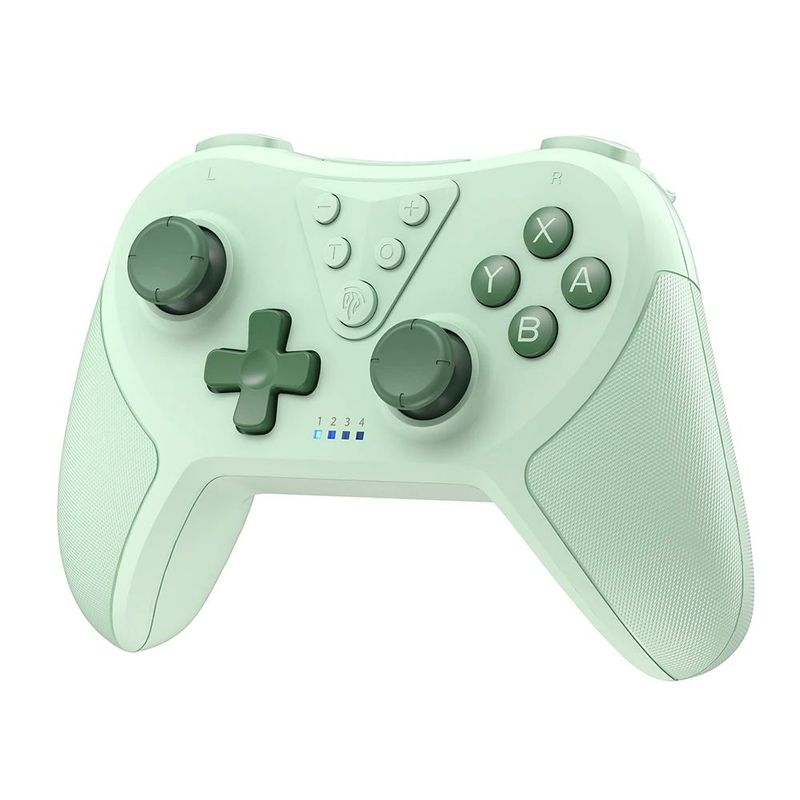
Manette de jeu Bluetooth EasySMX T37, contrôleur Switch Pro sans fil
€32.32
€34.32
-6%
€2,500.00-€250.00
€1,999.00-€200.00
€1,299.00-€130.00
€889.00-€90.00
Numéro d'article: 31869721
Couleur
2,99 € Livraison Voghion
Arrive dans 20 à 40 jours ouvrables
Buyer Protection
Caractéristiques de l'article
Raccordement
Sans fil, Bluetooth, filaire
Marque compatible
Nintendo, Microsoft, Atari
Description de l'article par le vendeur
EasySMX T37 Bluetooth Gamepad, Wireless Switch Pro Controller for Nintendo Switch, Steam Deck, PC, with 6 Axis Gyroscope
1. Compatible with Nintendo Switch, Switch Lite, Switch OLED, PC, Steam Deck
2. High precision 360° adjustable joystick and supports wake-up function
3.6 Axis gyroscope motion control supports 4 levels of adjustable vibration
4. Ergonomic design and comfortable rubber grip, with turbo function
5. The back of the controller is designed with a reset button
What's Included in Box
1 x EasySMX T37 Wireless Switch Controller
1 x Type-C Charging Cable
1 x User Manual
Mode and Connection
Connect Switch
1.Turn on the switch, disable airplane mode, and turn on the device
2. Enter the wireless pairing mode and press the home button on the controller to change grip/order
3.Hold the HOME button for 3 seconds until the controller channel LED lights (LED1-LED4-LED1) start running in a slow-to-fast sequence, indicating the wireless pairing mode
Connect PC
Connect the control
read
Please connect to the PC via USB data cable (LED2 will be on in PC X-input mode, solid when fully charged, and blinking when charging.)Windows will automatically install the driver
Connect Steam Platform
After connecting the controller to the computer, open Steam, and it will automatically detect the Steam mode (LED1 will be on)