

Voghion: Przeglądaj, kupuj, ciesz się
Kupony o wartości 99 € dla użytkowników aplikacji
DOSTAWAĆ








1/7
4 bezodsetkowe raty dwutygodniowe
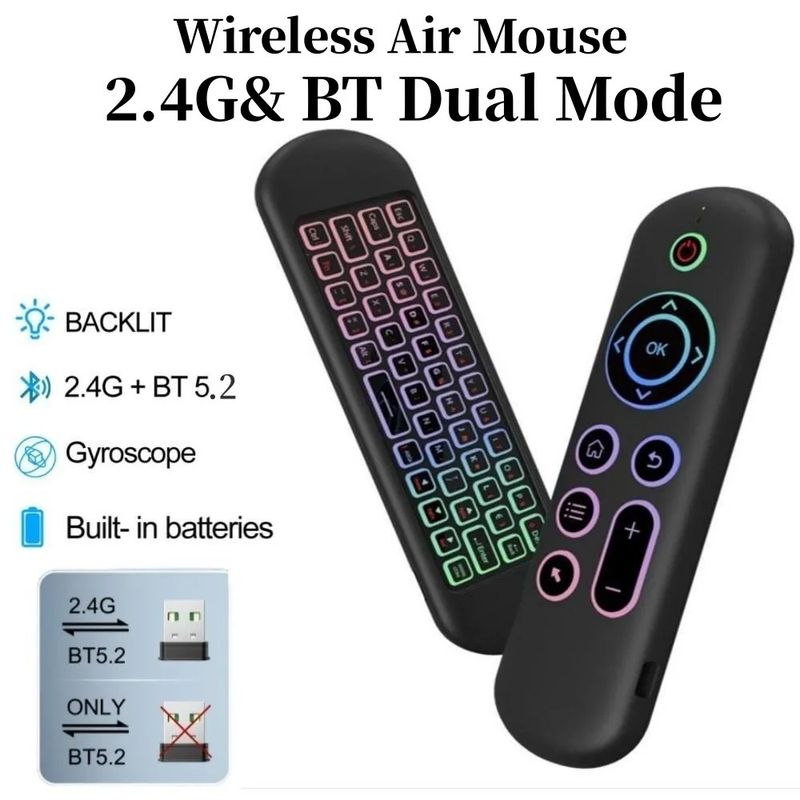
Bezprzewodowa mysz M5 Air Mouse Bluetooth 5.2 2,4 GHz Mini klawiatura z podświetleniem i funkcją uczenia się głosu, pilotem na podczerwień do komputera z systemem Android
117,50zł
149,33zł
-21%
10 681,39zł-1 068,14zł
8 540,84zł-854,51zł
5 550,05zł-555,43zł
3 798,30zł-384,53zł
Pozycja nr: 32448885
Kolor


8,50 zł dostawa Voghion
Dostarczone w ciągu 18~30 dni roboczych
Buyer Protection
Szczegóły przedmiotu
Kompatybilna marka
Msi,Acer,Apple
Opis przedmiotu od sprzedawcy
M5 Specifications:
Remote control distance: about 10 meters
Charging port: Micro USB
Overall dimensions: 155* 45* 9 mm
Net weight of product: 58g
Wireless modulation mode: GFSK
Modulation frequency: 2.4 ~ 2.4835 GHz
Number of keys: 58
Support system: for Android / Windows / OS / Linux
2.4G MODE
1. For initial use, plug a USB receiver into the USB port of the device and wait for 20-60 seconds to install the USB receiver driverMove the mouse the mouse cursor can move on the screen means that pairing is successful
2. If it is unsuccessful, press and hold the [OK] and [BACK] buttons, the LED light will start flashingPairing is successful when LED light stops flashing
BT 5.2 MODE
1 .Before using this device, first you must turn on the Bluetooth function of the other device
2 .Then long press ; OK + Return keys, when the LED flashes quickly, the product enters pre-pairing
3, Click add search new devices on the main device to find this air remotes name Example: BT-REMOTETslick the name chan t
o connecting
4 .After the product is successfully connected, the direction of the mouse pointer can be controlled by waving in the air
5. If the connection is not successful, please perform the operation steps from item 2-4 again
6 .Reconnect efficiency description: The normal reconnect time of this product is 3-5 seconds after it is normally paired with the main equipment
7 .This product can only remember the pairing information of one main device. When the product is connected to a new device, the connection of historical devices is not supported afterwards
G10S Pro with Bluetooth, with Gyroscope, with Backlight, with Bluetooth
Features:
- [Voice Search Function]
- V10 has a voice search functionAl iu have to do is askSpeak into the voice remote control and V10 Box
- [ Air Mouse Gyroscope Function ]
With 3-Gyro + 3-Gsensor, it's more convenient to operate easily in both horizontal and vertical modes
- [ IR Learning Function ]
Only the power button can program / learn the function