

Voghion: Explora, compra, disfruta
Cupones de 99€ para usuarios de la aplicación
CONSEGUIR








1/6
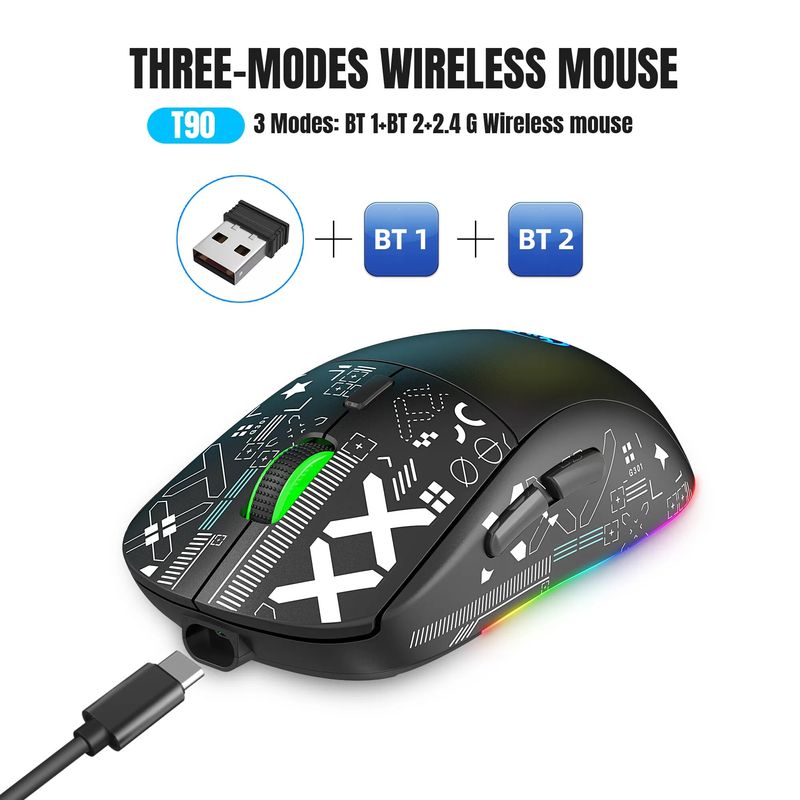
Ratón inalámbrico con retroiluminación RGB, inalámbrico por USB, recargable, 2,4G, Bluetooth, 3 modos, para iPad, tableta, ordenador portátil
RON142.72
RON188.36
-24%
RON5.14-RON5.09
RON12,720.05-RON1,272.00
RON10,170.95-RON1,017.60
RON6,609.34-RON661.44
Número de artículo: 19798565
Color


Entrega de Voghion por 15,21 RON
Llega en 20~40 días hábiles.
Buyer Protection
Especificaciones del artículo
Características
Otro,Rgb,Luz única
Eje
Otro, eje rojo, eje del té
Teclado numérico
No si
Conexión
Inalámbrico, Bluetooth, Otro
Tamaño
<100 mm, >130 mm, 100 mm-120 mm
Marca
VBVC
Descripción del artículo del vendedor
Technical Parameters:
1. 3 Modes: 2.4 G Wireless+BT 1+BT 2
2. Rechargeable: 750mAh Built-in Rechargeable Battery
3. Accurate tracking: PAW3212 PIX professional IC positioning accuracy
4. 10M Wireless Receiving Distance
5. Five-speed DPI adjustment design,Max 3600dpi.
6. 10 million times Mute switch design(Left and Right Buttons)
7.Adopting water transfer printing design, it has a fashionable appearance and comfortable grip.
8.Light mode: RGB and other 12 lighting modes, long press DPI for three seconds to switch between 12 lighting modes, including off light mode.
Product Parameters:
Brand/Model: HXSJ/T90
IC: PixArt 3212
Rate of return: 125HZ
Movement speed: 30IPS
Refresh rate: 4800FPS
Acceleration: 10G
Operation Mode: Opto-electronic
Type: 2.4 GHz/BT1/BT2
Power Type : Rechargeable
Number of keys : 6 keys
Key life : 10 million switches
Light type : 12 Lighting Modes
Wireless distance : 10m
Battery capacity : 750mAh
DPI : 800-1200-1600-2400-3600
Rated voltage / current : 3.7V / 15mA
Product weight : 101g
Product size : 12.8 * 6.3 *4cm
Package weight :142g
Package size : 13.5*8.5*4.7 cm
Package includes :
1 x 2.4G/BT1/BT2 Wireless Mouse
1 x USB Receiver
1 x Type-C Charge Cable(80CM)
1 x Instruction manual
Applicable system:
In BT mode :
Windows ( windows XP / Vista / 7 / 8 / Server 2003 / 2000 / Win10 ,etc) Android (Android4.3 above) OS ( OS 10.10 above is recommended).
In 2.4G mode:
suitable for desktop computers, notebook computers, smart TV with USB interface, etc.
Sleep mode:
1: After the mouse is stationary, it immediately goes to shallow sleep.
2: After 1.5 minutes of mouse rest, enter intermediate sleep and turn off RGB lights,
3: Pause the mouse for 10 minutes to enter deep sleep.
HOW TO USE:
USB 2.4G mode connection steps:
1. Set the mouse switch to ON .
2. Plug the receiver into the computers USB port. Press the mode button once.The red LED flashes and the installation is done automatically.
BT Mode:
To turn on the BT mode, you need to press the mode button for 3 seconds and the green light flashes quickly,indicating that the Bluetooth mode is activated and you can search for connections.
BT Mouse1 mode connection steps:
1. Turn on the BT icon on your computer.
2. Turn on the mouse power switch, press the mode switch 2times, the second mode light turns green and flashes quickly.
3. Enter BT Mouse 1 BT Wireless connection mode for pairing.
BT Mouse 2 mode connection steps:
1. Turn on the BT icon on your computer.
2. Turn on the mouse power switch, Press the mode switch 3 times, the third mode light turns blue Flashing quickly.
3. Enter BT Mouse 2 Wireless connection mode to select pairing.
Package Included:
1*mouse